
Data Explorer • Repo Rankings • Developer Analytics • Repo Analytics • Collections • Workshop • Blog • API • Twitter
OSS Insight is a powerful tool that provides comprehensive, valuable, and trending insights into the open source world by analyzing 10+ billion rows of GitHub events data.
OSS Insight's Data Explorer provides a new way to explore GitHub data. Simply ask your question in natural language and Data Explorer will generate SQL, query the data, and present the results visually.
OSS Insight also provides in-depth analysis of individual GitHub repositories and developers, as well as the ability to compare two repositories using the same metrics.
🎦 Video - OSS Insight: Easiest New Way to Analyze Open Source Software
Data Explorer provides a new way to discover trends and insights into 5+ billion rows of GitHub data.
Simply ask your question in natural language and Data Explorer will generate SQL, query the data, and present the results visually. It's built with Chat2Query, a GPT-powered SQL generator in TiDB Cloud.
Examples:
- Projects similar to @facebook/react
- The most interesting Web3 projects
- Where are @kubernetes/kubernetes contributors from?
- More popular questions
🎦 Video - Data Explorer: Discover insights in GitHub data with GPT-generated SQL
-
GitHub Collections Analysis
Find insights about the monthly or historical rankings and trends in technical fields with curated repository lists.
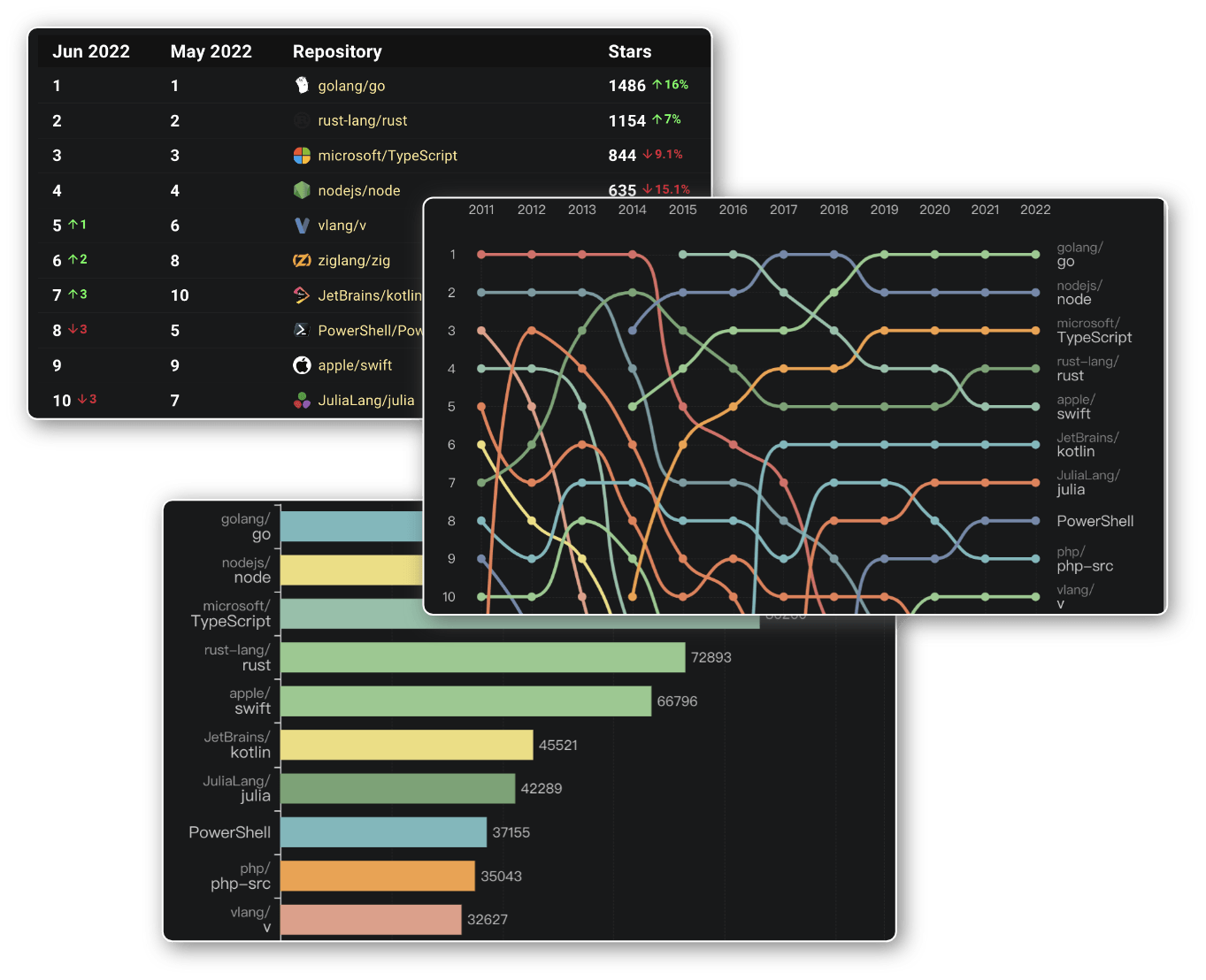
Examples:
Welcome to add collections
👏 We welcome your contributions here! You can add a new collection or add repositories to an existing collection by submitting PRs to etl/meta/collections/.
- Add repos to an existing collection: Edit the corresponding
.ymlfile and append repository names to theitemslist. - Add a new collection: Create a new
.ymlfile named<id>.<name>.ymlwith the following format:
id: <collection_id>
name: <collection_name>
items:
  - owner/repo-1
- owner/repo-2-
Deep Insight into some popular fields of technology
Share with you many deep insights into some popular fields of technology, such as open source Databases, JavaScript Framework, Low-code Development Tools and so on.
Examples:
- Deep Insight Into Open Source Databases
- JavaScript Framework Repos Landscape 2021
- Web Framework Repos Landscape 2021
- More ...
We’ll also share the SQL commands that generate all these analytical results above each chart, so you can use them on your own on TiDB Cloud following this 10-minute tutorial.
Insights about developer productivity, work cadence, and collaboration from developers' contribution behavior.
- Basic:
- Stars, behavior, most used languages,and contribution trends
- Code (commits, pull requests, pull request size and code line changes), code reviews, and issues
- Advanced:
- Contribution time distribution for all kind of contribution activities
- Monthly stats about contribution activities in all public repositories
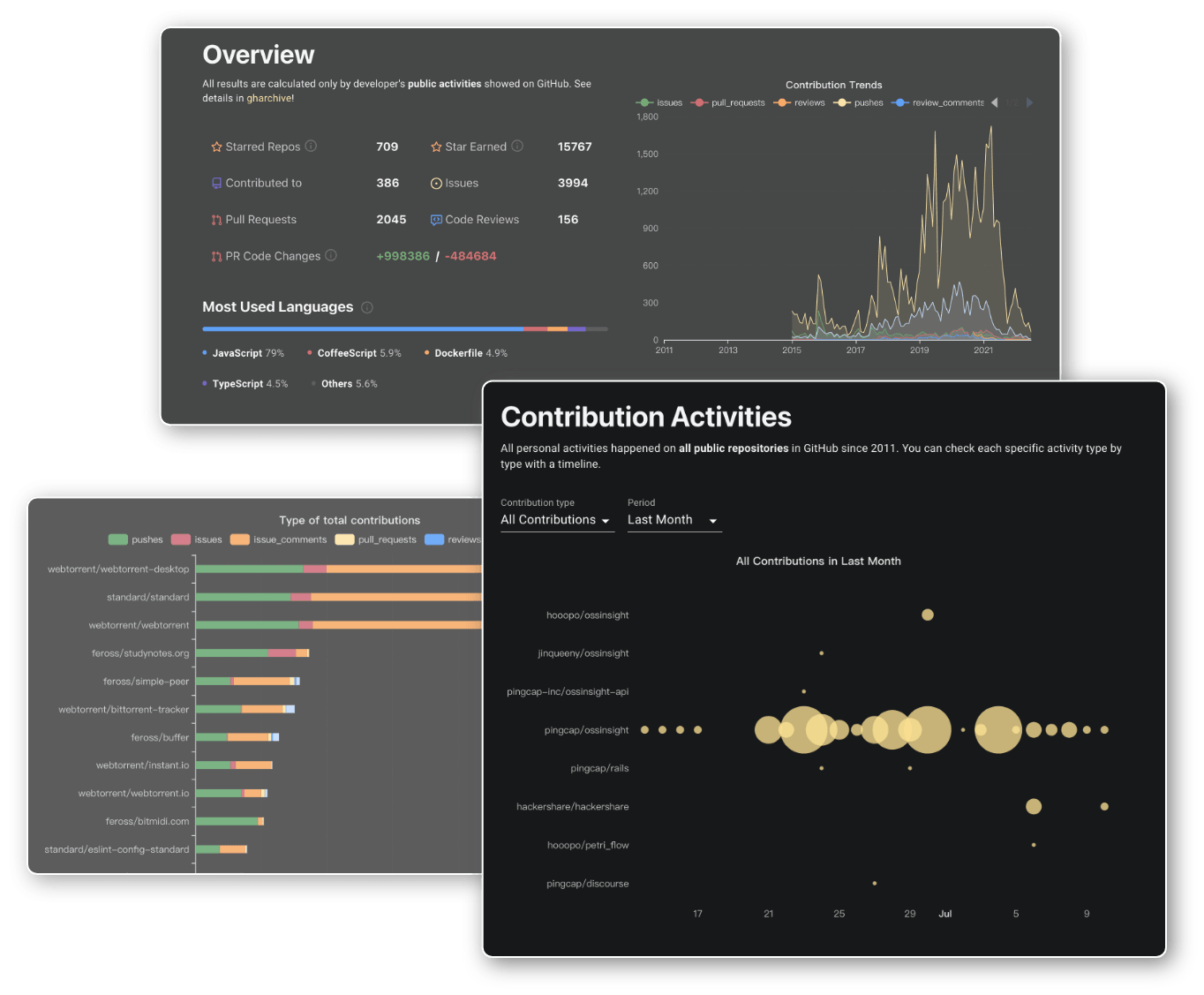
Insights about the code update frequency & degree of popularity from repositories' status.
- Basic:
- Stars, forks, issues, commits, pull requests, contributors, programming languages, and lines of code modified
- Historical trends of these metrics
- Time cost of issues, pull requests
- Advanced:
- Geographical distribution of stargazers, issue creators, and pull request creators
- Company distribution of stargazers, issue creators, and pull request creators
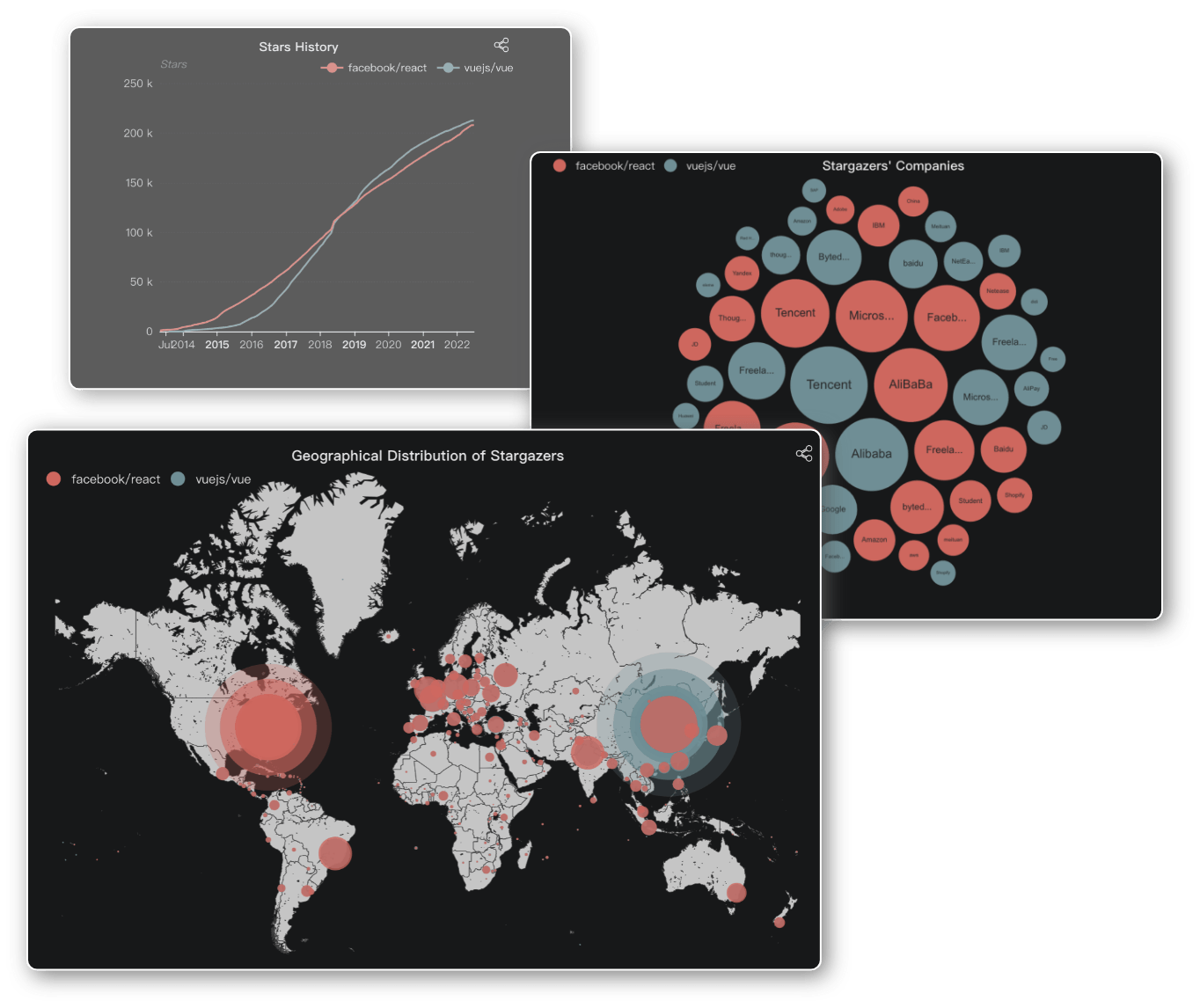
Examples:
Compare two projects using the repo metrics mentioned in Repository Analytics.
Examples:
We've released OSS Insight because it can do more insights about GitHub. We hope that others can benefit from the project. We are thankful for any contributions from the community.
- GitHub Discussions: help with building, discussion about best practices.
- GitHub Issues: bugs, feature requests, and collection suggestions.
- GitHub PRs: pull requests for features, fixes, and blog posts.
We have a few channels for contact:
- GitHub Discussions: You can ask a question or discuss here.
- @OSS Insight on Twitter
- TiDB Community: This is the place to discuss anything related to TiDB.
- mail:If you want to analyze more, please contact us ✉️
pnpm install
pnpm dev        # Start web app (port 3001)
pnpm dev:docs   # Start docs site (port 3002)
pnpm dev:all    # Start both


![@tidb-cloud-data-service[bot]](https://avatars.githubusercontent.com/in/339058?s=64&v=4)


